Remote PAC Assy
Prerequisites
Overview
Procedure
- Remove following covers.
-
Right side cover (Refer to R/L Side Cover.)
-
Right front and rear skirt covers (Refer to Skirt Cover Removal.)
-
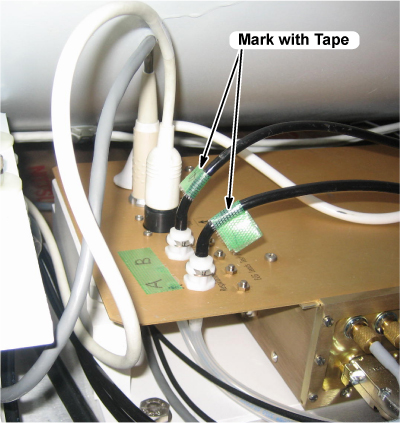
- Mark the 2 black cables on PAC I/F unit with tape.
Figure 1. Front Left Arc Cover Removal
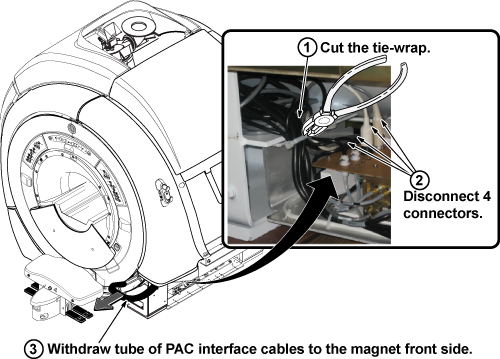
- Disconnect the 4 connectors of PAC remote from the PAC unit upper side. (Refer to illustration 2.)
- Withdraw PAC interface cables from the magnet front under side.
(Refer to illustration 2.)
Figure 2. PAC Interface Cables
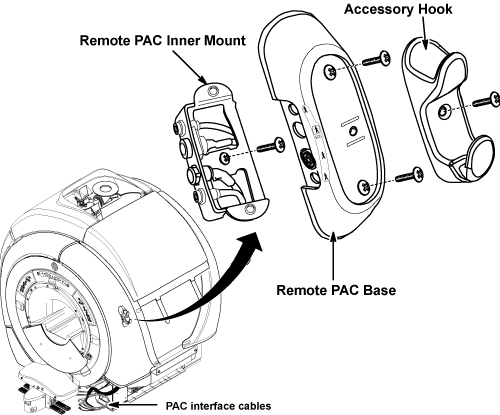
- Remove the accessory hook by removing a screw. (Refer to illustration 3.)
- Remove the remote PAC base by removing 2 screws. (Refer to illustration 3.)
- Remove remote PAC inner mount by removing a screw from the arc
cover. (Refer to illustration 3.)
Figure 3. Remote PAC Removal
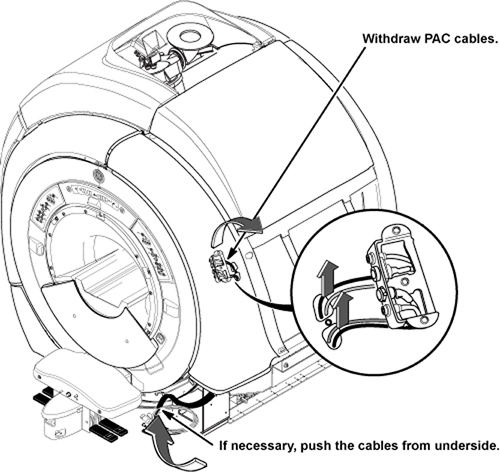
- Withdraw remote PAC cables from the inner tube of arc cover.
Figure 4. Withdraw remote PAC cables
 note:
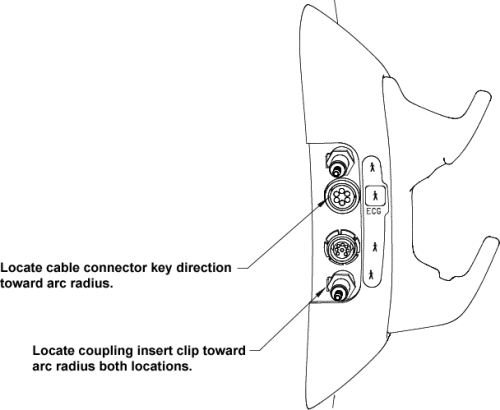
note:If replacing the tube, install the tube connector in direction of figure.
Figure 5. Connector Direction
- Installation is reverse order of removal.
1 Finalization
Procedure
- Perform PAC manual Test.
- Perform Signal to Noise - Head Scan.