Rear Pedestal Sensor Flag Replacement
Prerequisites
Overview
Procedure
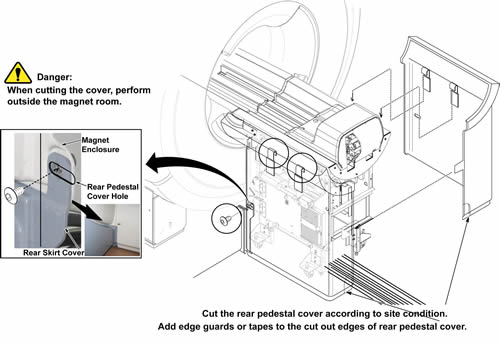
- Remove L Rear pedestal cover (Refer to Rear Pedestal Cover.).
Figure 1. L Rear Pedestal Cover
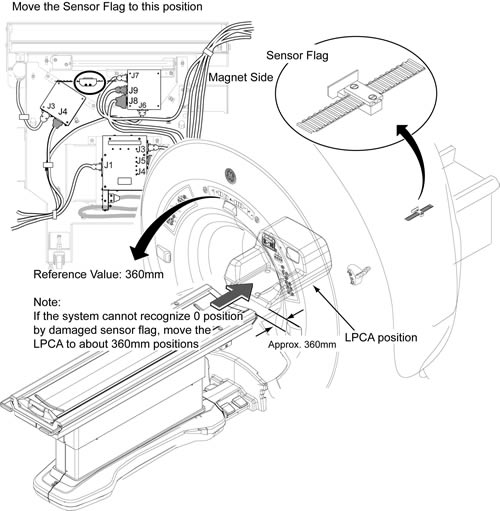
- Move the LPCA to IN direction as shown illustration. (Reference Value 180 mm to IN direction)
- Check that there is Sensor Flag at position of illustration.
Figure 2. Move to sensor flag removal position
- System Power must be turned OFF. Refer to Lockout / Tagout for System Cabinet PDU Main Breaker
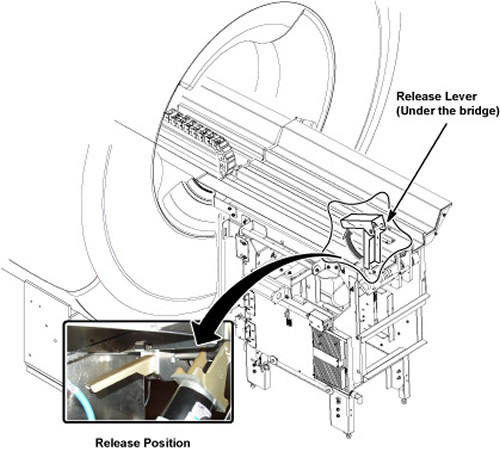
- Loosen the belt tension with belt tension lever.
Figure 3. Belt Tension Release Lever
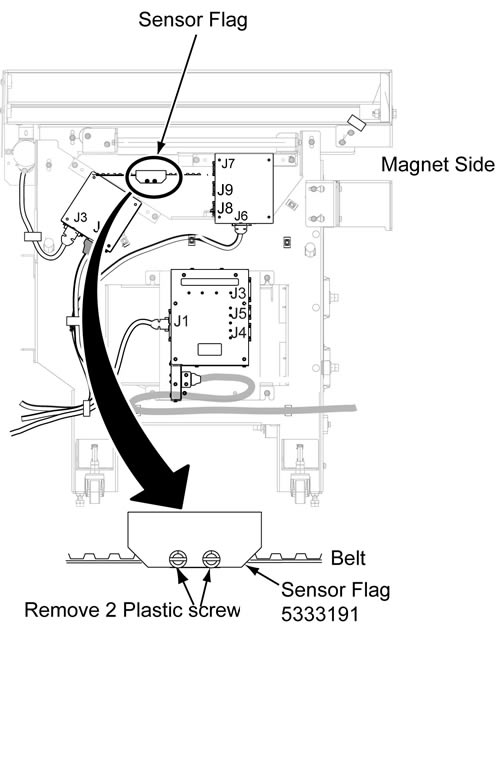
- Remove the Sensor Flag by removing the 2 screws.
Figure 4. Sensor Flag Removal
- Restore it by reversing the order of the removal procedure.
1 Finalization
Procedure
- Restore the Power. Refer to Lockout / Tagout for System Cabinet PDU Main Breaker.
- Perform Longitudinal Drive calibration.
- Perform DQA Tool to adjust Isocenter z.