Lockout / Tagout for HDe 1.5T System Cabinet PDU Main Breaker
Prerequisites
This document covers PHOENIX Power Distribution Unit (PDU) (ACGD and GRFD- OpenSpeed)- Lockout and PHOENIX Power Distribution Unit (PDU) (ACGD and GRFD- OpenSpeed) - Restoring Power. Prior to performing work on the System Cabinet electronics (except PDU) and electronics in Magnet Room, the steps in this Lock Out Tag Out Procedure must be performed by a LOTO Authorized GE Field Engineer. Completing all steps in this procedure will ensure a safe environment when working on these parts.
1 Power Down the computer subsystems and perform LOTO for GOC
Procedure
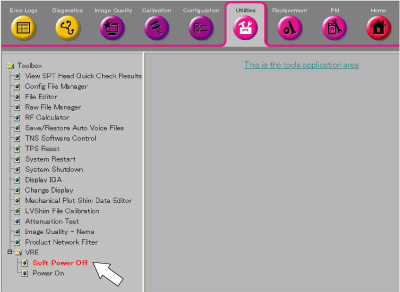
- From Common Service Desktop, click 'Utility / VRE / Soft Power Off'
to turn off the VRE.note:
It is not necessary to perform Software Power OFF for VRE from HDE14.0_M4 software.
Figure 1. VRE Soft Power OFF
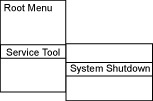
- At the background of desktop, right click and select 'Service Tool /
System Shutdown' to shutdown the system.
Figure 2. System Shutdown
- Select OK to confirm the shutdown.
- Wait for the system to indicate on the monitor that it is safe to power off the computer before proceeding. (This usually takes about 90 seconds before this message is seen.)
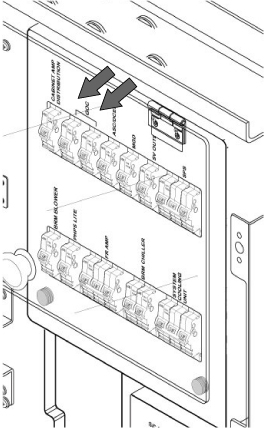
- Open plastic Cover. Remove power to the Operators Workspace by shutting
off the GOC breakers on the front of the PDU. See Figure 3.
Figure 3. Breaker Locations on PDU
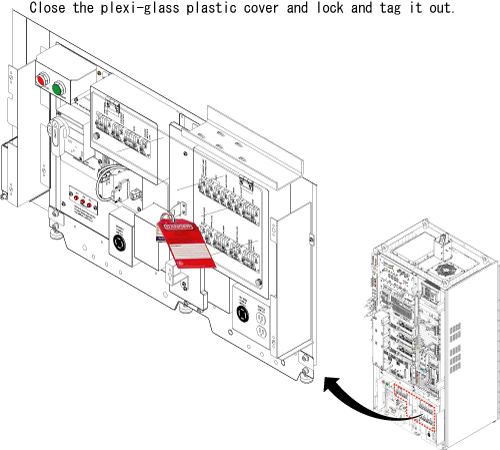
- Lock and Tag the Breaker Panel on the PDU.
Figure 4. Lock and Tag the Breaker Panel
2 HDe 1.5T System Cabinet PDU Main Breaker - Lockout
Procedure
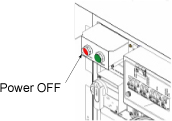
- At the front panel of the PDU, press the Power Off button.
Figure 5. Power Off button
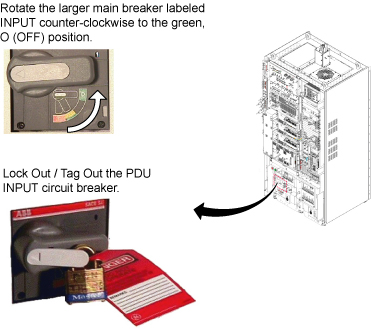
- Rotate the larger main breaker labeled INPUT counter-clockwise to the green, OFF (O) position.
- Lock Out Tag Out the PDU “INPUT” circuit breaker.
- Press on the left-pointing arrow on the end of the handle to expose the location where the lock and tag can be placed.
- Lock and tag out the PDU “INPUT” circuit breaker.
Figure 6. MAIN INPUT BREAKER IN THE OFF POSITION
3 HDe 1.5T System Cabinet PDU - Restoring Power
Procedure
- Alert necessary personnel that power is being re-applied.
- Remove the Lock and the Tag from the PDU “INPUT” circuit breaker.
- Rotate the larger main breaker labeled INPUT clockwise to the Red, 1 ONposition.
- Flip the circuit breaker for the Operators GOC ON.
- Open plastic door over the front of the PDU breakers and power on any other appropriate circuit breakers, you may have turned off.
- Boot Signa and log into scanning level
4 Finalization
Procedure
- Insure all subsystems have powered up successfully
- Do a test phantom scan to insure proper scanning