Lockout / Tagout for the GOC
Prerequisites
The PDU has a clear plastic cover over the breaker panel. This clear plastic cover allows for local power isolation using individual breakers for sub components in the Signa System. This procedure describes how to shutdown GOC and perform LOTO. Prior to performing work on the GOC, the steps in this Lock Out Tag Out Procedure must be performed by a LOTO Authorized GE Field Engineer. Completing all steps in this procedure will ensure a safe environment when working on these parts.
1 PDU with Plastic breaker Cover- Sub-System Lockout
Procedure
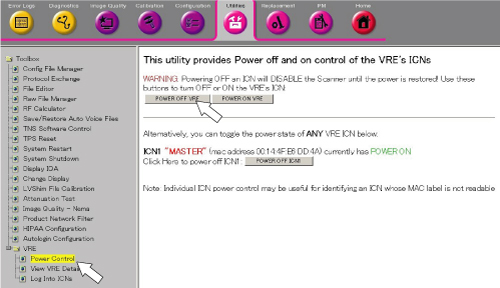
- From Common Service Desktop, click 'Utility / VRE / Power Control'
and select [POWER OFF VRE] to turn off the VRE.
Figure 1. VRE Soft Power OFF
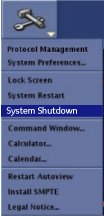
- To shut down the system, click the arrow on the Tools
High Level Access tab, select System Shutdown, and then click [Yes] to confirm the shut down.
Figure 2. System Shutdown
- Confirm that the system is shut down.
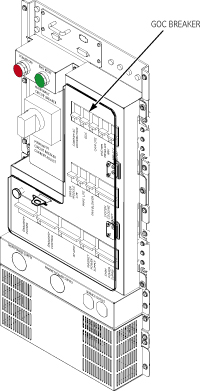
- Open plastic Cover. Remove power to the Operators Workspace
by shutting off the GOC breakers on the front
of the PDU. See Figure 3.
Figure 3. Breaker Locations on PDU
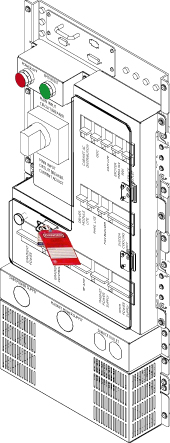
- Lock and Tag the Breaker Panel on the PDU.
Figure 4. Lock and Tag the Breaker Panel
note:
GOC breaker is named as GOC on PDU breaker panel.
2 PDU with Plastic breaker Cover- Sub-System Lockout - Restoring Power
Procedure
- Alert necessary personnel that power is being re-applied.
- Remove the lock and the tag.
- Open plastic door over the front of the PDU breakers and switch on GOC Breakers on the PDU.
- The computer will run the boot Sequence.
- Log in: signa
- Password: adw2.0
3 Finalization
Procedure
- Insure all subsystems have powered up successfully
- Do a test phantom scan to insure proper scanning