1.5T Neurovascular Array Installation
Prerequisites
Follow this process to install the 1.5T Neurovascular (NV) Array by Medrad (M3087JJ).
Procedure
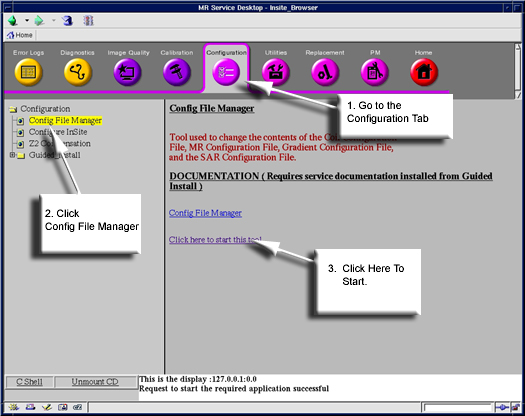
- Go to the Service Desktop and start the Service Desktop Browser if it's not already running.
- Follow the steps shown in Figure 1.
Figure 1. Starting the Config. File Manager
- Click the CoilConfigbutton on the left.
The following screen will appear, see Figure 2.
Figure 2. CoilConfig Screen
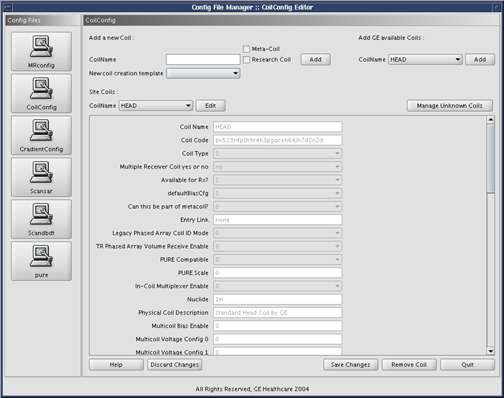
- Add the following coil names to the list of site coils.
-
HDNV Array
-
HDNV Head
-
HDNV Head Neck
-
HDNV Neck
-
HDNV Spectro
-
HDNV ArrayServ
-
HDNV HeadServ
-
HDNV HdNeckServ
-
HDNV NeckServ
-
HDNV SpectroServ
-
- Restart Signa.
- Perform the Multi-Coil Quality Assurance Tool if available, otherwise perform the Surface Coils SNR Test.
- Add the following traced part number(s) to product locator: 5117092-2
Finalization
No finalization steps.