VRE Reconstruction Diagnostics
1 Diagnostic Link
Diagnostics >> System Function >> Recon >> VRE Reconstruction Diagnostics
Diagnostics >> Hardware Location >> System Cabinet >> Recon >> VRE Reconstruction Diagnostics
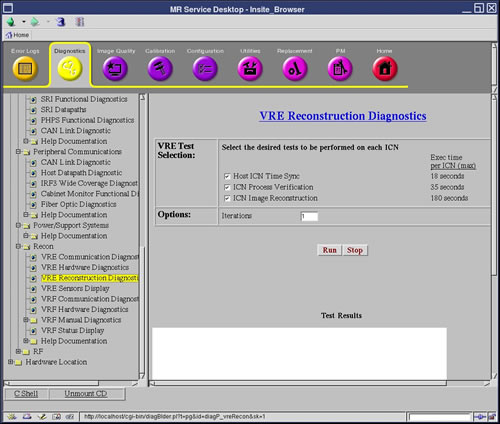
Figure 1. VRE Reconstruction Diagnostics
2 Purpose
This document describes the VRE Reconstruction Diagnostics including:
-
Host ICN Time Sync Diagnostic - This diagnostic tests the time synchronization between the host and ICN. It attempts to execute the date command on the ICN via the remote shell protocol. The ICN and host times are compared to ensure that they meet specifications.
-
ICN Image Reconstruction - This diagnostic tests the functionally of the ICN’s image reconstruction capabilities. In doing so, each ICN will have its components tested, that is, memory, processors, software and so on. This ensures that each ICN is capable of performing image reconstruction.
This test takes a set of previously collected raw data, and reconstructs the whole set several times, testing image integrity by performing checksums on the images and validating them against saved checksum values.
-
ICN Process Verification - This diagnostic tests the correct number of processes (like recon, acquisition) is running on an ICN. This diagnostic uses a configuration file that specifies the process name and the number of instances that should be running on the ICN.
3 Block Diagram
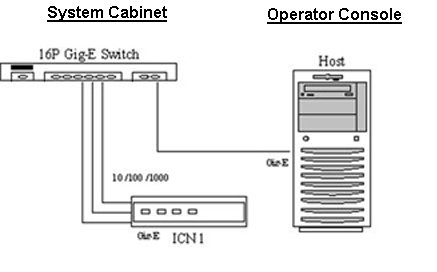
Figure 2. VRE Hardware Communication Block Diagram
4 Requirements
The ICNs must be turned on and have a network connection to the Host.
5 Host ICN Time Sync Diagnostic
5.1 Test Sequence
-
Select Host ICN Time Sync.
-
Click Run.
-
Ensure that each ICN tested passes.
5.2 Components Tested
-
Remote Shell service on the ICN
-
Host and ICN Time synchronization
5.3 Results
6 ICN Image Reconstruction
6.1 Test Sequence
-
Ensure that the ICNs are turned on.
-
Select ICN Image Reconstruction.
-
Click Run.
note:Once you click Run, do not click anywhere else in the Common Service Desktop until the test is completed. If you need to abort the test, you must click Stop.
6.2 Components Tested
-
ICN hardware
-
ICN software
-
Software communication between ICNs
6.3 Results
7 ICN Process Verification
7.1 Test Sequence
-
Select ICN Process Verification.
-
Click Run.
-
Ensure that each ICN passes.
7.2 Components Tested
Processes running on the ICN