IRF3 Wide Coverage Diagnostic
1 Diagnostic Link
Diagnostics >> System Function >> RF >> IRF3 Wide Coverage Diagnostic
Diagnostics >> Hardware Location >> System Cabinet >> RF >> IRF3 Wide Coverage Diagnostic
Figure 1. IRF3 Wide Coverage Diagnostic
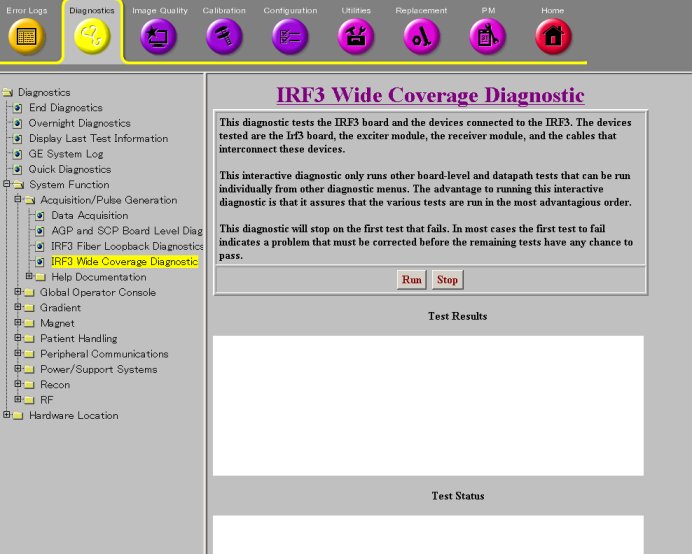
2 Purpose
The IRF3 Wide Coverage Diagnostic is an interactive test that invokes other IRF3 related diagnostics in an optimal order. The diagnostic stops at the first error found and prints a red message to the screen indicating that this error must be corrected before continuing.
The sub-diagnostics are run in this order:
-
IRF3 BLD
-
SRF to IRF DP
-
DTX BLD
-
RRX BLD
-
SRF to RRX+DTX DP
-
RF Calibration
-
DTX to RRX DP
-
TNS DP
This diagnostic only runs other board-level and data path tests that can be run individually from other diagnostic menus.
3 Components Tested
-
IRF3 Board
-
Exciter Modules (DTX)
-
Receiver Modules (RRX)
-
Cables that interconnect these devices
4 Requirements
None
5 Test Sequence
The sub-diagnostics are run in this order:
-
Click Run.
-
Ensure that the diagnostic passes by reviewing the status in the Test Results table.
6 Expected Results
This diagnostic has either a passed or failed status. If the diagnostic has failed, please review the error log and corresponding extended error message for subsequent actions.
In the event that the diagnostic reports a timeout, the diagnostic may not have been executed. Retry the test. If it continues to time out, complete a TPS Reset and then retry the test.